
Following the explosive growth of artificial intelligence, particularly in image generation, those of us working in visual effects have been exploring ways to bring this technology into our everyday workflows. CopyCat is one such tool. Introduced by Foundry in Nuke in 2021, it opened up a new way of working in which machine learning becomes part of the compositing pipeline.
In this article, I’ll explain what CopyCat is, how it works, what to consider when training a model, and some less conventional applications that can extend what we do as compositors.
What is CopyCat?
CopyCat is a machine learning tool that allows artists to train their own models using examples they have created. It learns the transformation between an original image and a modified version of that image, and can then apply the same transformation to other, similar images.
Inside Nuke, CopyCat behaves like any other node. At first glance, the workflow is fairly simple: it has two inputs called Input and Ground Truth (see Figure 1). We connect an unchanged image to Input, and a version of that same image containing the completed work to Ground Truth. During training, CopyCat compares the two. The result is a trained model, saved as a .cat file, which can be loaded by an Inference node to reproduce the transformation on other images.

The first uses that come to mind are probably rotoscoping an element in a shot or removing a mole from an actor’s face. These are perfectly valid applications, although we’ll see that CopyCat can do much more.
For a simple task, we might select as few as four keyframes; for a more complicated element, we could need twenty or more. These frames should be as varied as possible, representing changes in lighting, viewing angle, position, deformation, and anything else that may occur in the shot. That variety will help the model cope with frames it has not seen during training. For every selected Input frame, we also need a matching Ground Truth frame showing the desired result, whether it is a roto mask, a cleanup, or something entirely different.
Training the Model
With those two sequences connected, we could simply press Start Training, and CopyCat would begin to learn. But I would recommend going one step further: generating variations of the training frames. Each variation could contain a slight rotation made with a Transform node, a change in exposure, saturation, or contrast using a ColorCorrect node, and so on.
This approach, usually called data augmentation, can turn a handful of different frames into dozens or hundreds of examples. The idea is to expose the model to a broader range of conditions so that it can better handle variations in the final shot.
Before starting, however, there are three settings in the CopyCat properties worth understanding: Epochs, Model Size, and Crop Size.
- Epochs: The number of passes the tool makes over the training dataset, consisting of the images supplied to Input and Ground Truth. A higher value gives the model more opportunities to adjust its internal weights and learn the transformation.
- Model Size: This can be set to Small, Medium, or Large. Larger models have more capacity to learn complex transformations, including intricate silhouettes, subtle gradients, and fine details. Smaller models are faster to train and need fewer GPU resources, but may not represent particularly complicated transformations as well.
- Crop Size: The size of the square image patches randomly sampled during training. Depending on the available settings, these patches can range from relatively small areas to several hundred pixels across. Larger crops provide more visual context, which may help the network learn relationships between features, but they consume more memory and take longer to train. Smaller crops are less demanding and can be faster, although the model sees less surrounding information in each sample.

There is no single set of parameters that works best for every task, so some trial and error is unavoidable. We can still make an informed starting choice. Imagine using CopyCat to generate masks for a moving macaw: its silhouette, feathers, colours, and features change constantly (see Figure 2). A Medium or Large model and a relatively large crop might make sense for that kind of work.
On the other hand, if the aim is to remove grain from an image sequence, a smaller crop may be more useful. In that case, we’re less interested in the structure of the objects on screen than in patterns that operate at a scale close to individual pixels.
The number of epochs depends on the complexity of the task as well. For relatively simple transformations, CopyCat’s default of 10,000 may be enough. More complex work might benefit from 30,000 or 60,000, although increasing the number is not a guarantee of a better result.
Better still, CopyCat training is iterative. Unlike rendering a final image, we can stop training, inspect the outcome, extend the run, or introduce new examples before continuing.
During training, CopyCat displays samples in three columns (see Figure 3): the original Input, the Ground Truth, and the network’s current result. If that third column begins to resemble the second, we’re probably on the right track.
The Progress tab also displays a graph showing the training loss, which should generally decrease as the model improves. Sometimes a loss below 0.02 may be encouraging, but the figure alone cannot tell us whether a model is usable: the final visual result, particularly on frames it has not been trained on, is what matters. If the graph stagnates or starts climbing, we should check that our input and target images match, that the image values are appropriate for the training setup, and whether the model needs additional examples.

Using Inference
When we’re satisfied with the training, we can press Create Inference to create an Inference node connected to the trained model. That node applies the learned transformation to new images, whether they are individual frames or the remaining frames of a shot. Usually, we train on a selection of keyframes and then apply Inference to the entire sequence.
Here’s where one of CopyCat’s strengths becomes apparent. As compositors, we regularly work on multiple shots that share a similar problem. Once an Inference model works well on the first shot, we can copy it into the next one and see what happens.
It may work immediately. But what if the new shot has a lighting condition the model has never encountered? We can select a few keyframes from that shot, prepare the corresponding Ground Truth images, and resume training from the previous model rather than starting from scratch.
The updated model can then learn from the new examples. We can repeat the process as we move through a sequence, gradually expanding the range of conditions that the model can handle. Eventually, we may have an Inference model capable of working across an entire sequence or even several sequences throughout a film.
From Simple to Complex
So far, we’ve looked at CopyCat in its most familiar form: training it to reproduce work such as roto or cleanup. Useful, certainly, but can we go further? If CopyCat can transform one image into another, could we extract the complex details of a real-world element and apply them to something much simpler created digitally?

Look at Figure 4. On the left, we have a single image of a flame. For this experiment, the fact that it is just one image is important. Notice its irregular edges, internal detail, texture, and colour variation.
Now let’s strip away that complexity. We can desaturate the flame and apply a simple Blur, producing something like the image in the middle.
This time, we’ll train CopyCat in the opposite direction: the desaturated, blurred flame goes into Input, while the detailed original becomes Ground Truth. We’re effectively telling the model that when it sees a simple, poorly defined shape like this one, it should turn it into detailed, realistic-looking fire. The image on the right of Figure 4 shows the result after training, and it closely resembles the original.

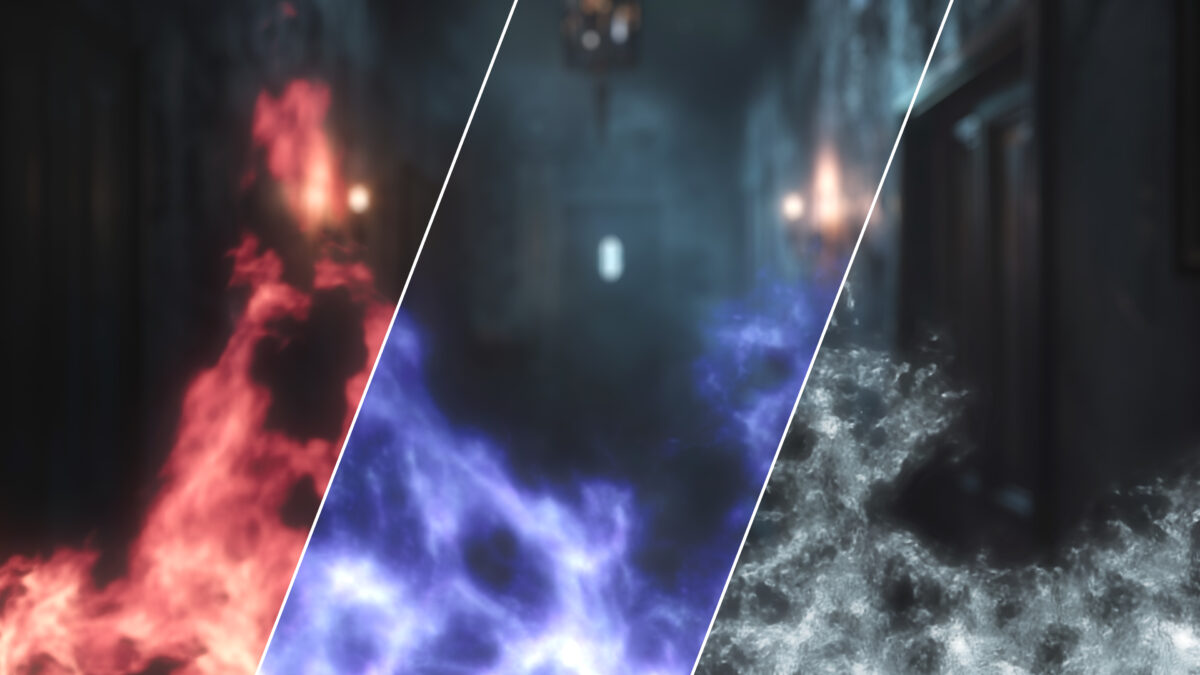
Now look at Figure 5. On the left is nothing more than a blurred white Noise pattern, deliberately darkened and distorted so it resembles a particle emitter. We take the Inference node trained on the flame and apply it to this Noise. The result, on the right, inherits much of the complexity, texture, and colour of the original flame.

This means we can learn the appearance of one element and use it to enrich another. Our Noise could just as easily be a simple particle simulation from Houdini, brought into Nuke to receive an additional layer of visual detail through machine learning.
We could also keep several Inference nodes trained on different types of elements or looks (see Figure 6), switching between them as needed. Applying an existing Inference model can be much faster and less resource-intensive than returning to 3D and re-rendering a simulation. It’s important to remember, however, that CopyCat changes the appearance of images; it does not change the underlying animation.


Creating Proxies
If CopyCat can give a simple image more complex detail, could we do something similar with 3D models? The answer is partly yes. CopyCat learns from 2D image data rather than directly from the geometry of a 3D scene, but we can render 3D information into images and use that information for training.
Imagine that we need to bring an object from a film set into Nuke and manipulate it in 3D space. Let’s use a stuffed toy as an example (Figure 7). From photographs of the real object, we could create a low-poly model with approximately the same proportions. It wouldn’t need to reproduce every detail.
The goal is to have an Inference model transform an image of this lightweight proxy into something that resembles the real stuffed toy, including the fine detail in its fur. In other words, we want a simplified 3D representation that can be turned into a much richer-looking image.
In theory, we could train CopyCat using renders from different camera angles as Input and corresponding photographs of the real toy as Ground Truth. In practice, simple images of the polygonal model would probably be too ambiguous: the network would have little information telling it exactly where the features of the real toy should go. The result might be blurry or poorly defined.
We need a more precise description of the object’s surface. Since CopyCat learns transformations between image values, one possible solution is to encode UV coordinates as an STMap, using the red and green channels to represent positions on the model’s surface. We could also use different values in the blue channel as ID information, allowing the network to distinguish between parts of the model.
Those additional channels give the network a more consistent relationship between the simple proxy and the appearance we’re trying to reconstruct (see Figure 7).

UV coordinates encoded in RGB are not the only option. We could build our own colour codes or patterns to communicate the structure of the object. Figure 8 shows another low-poly example, this time a building whose parts are identified with different coloured masks.
CopyCat can work with RGB, alpha, and other available image channels. That leaves plenty of room to experiment with different representations, depending on the information we want to teach it.

Controlling the Machine
If there’s one thing that matters in visual effects, it’s the artist’s control over the result. When people talk about AI for images, they often think of generative systems that can produce spectacular imagery but don’t always give the user precise control over how that imagery is created.
CopyCat differs in several important ways. Most importantly, we build the trained model ourselves. Rather than using a huge general-purpose system to do everything, we create a model focused on a specific task. We choose the examples, decide which transformation matters, and can adjust the training process as the work progresses.
And, of course, compositing is not just about producing a final picture. We work with control images all the time: masks, position passes, normals, UVs, vectors, and other data. Those passes make our setups flexible and allow us to address changes without rebuilding the entire effect.

Remember the coloured masks in Figure 2? Suppose we put those masks into Input, with the corresponding real macaw images connected to Ground Truth. In effect, we’re teaching CopyCat to translate a set of coloured regions into a photorealistic bird. Each colour describes a particular part of the animal, and together they describe its structure.
After training, Inference can turn those simple shapes into a complex image. But the really interesting part is that we can edit the shapes. If I draw an extra pair of eyes with the same colour used for the original eyes, the model can interpret those new shapes and produce additional eye-like detail (see Figure 9).
We could take this much further by creating procedural controls that modify the masks. Those controls could be driven by numerical values in a custom Nuke panel (see Figure 10). Our Inference models would then become components of entirely new tools, where precise, artist-friendly controls drive complex changes in the image.

Because the underlying idea is to transform information, we don’t have to stop at masks. We can also attempt to reconstruct data that normally comes from 3D. Let’s say we have a 3D model of a macaw. It doesn’t need to match the real bird perfectly, as long as the broad shape is reasonably similar.
We can match the 3D model to the real macaw in a few selected keyframes, render some useful passes, and train CopyCat to predict the corresponding passes for the rest of the footage. For this particular experiment, I used only about four keyframes.

The result is an animated sequence of information passes, such as UV coordinates and normals, that would normally come from a 3D render, but which now follow a real animal (see Figure 11).
Traditionally, we might have needed to animate the 3D model so it followed the bird’s movement precisely. Instead, a small number of approximately matched keyframes can be enough to produce remarkably useful results in considerably less time.
This approach is especially powerful because we are training CopyCat to create control passes instead of the final image. We can use those passes in other parts of the comp, make different versions of an effect, and retain a great deal of flexibility (Figure 12).

Another interesting case involves SmartVectors. If you’ve worked with them, you’ll know that extreme movement can sometimes prevent the vectors from returning accurately to their original positions, causing an applied texture to distort or drift over time.
With CopyCat, we can train a model using a handful of corrected keyframes to predict the desired texture position and deformation across the shot. This offers an alternative approach that can be especially useful for digital makeup and similar tasks.
A Simple Tool with Remarkable Potential
The examples described here represent just a few ways of using CopyCat. What we can do with it ultimately depends on the problem we’re trying to solve, the information available, and the imagination of the artist. The node itself may be straightforward to operate, but its potential applications go far beyond the most obvious ones.
That doesn’t mean CopyCat is a universal solution. It works best when there is a certain consistency between the training examples and the footage we want to process. For example, it would be a poor choice for reconstructing a background repeatedly obscured by unpredictable falling rain, where important image information is missing. It may also be unsuitable for very short shots or footage with abrupt changes that aren’t represented in the training data.
Training a model to fix a fifteen-frame shot could be like using a sledgehammer to crack a nut: doing the work manually might simply be faster.
Ultimately, CopyCat brings machine learning directly into the compositing workflow and lets artists train custom models that reproduce their own visual decisions. Unlike many general-purpose generative systems, which can feel like black boxes, CopyCat gives us much more control over the examples, the process, and the intended transformation.
In an industry looking for responsible and effective ways to use AI, it’s a compelling example of how the technology can amplify our abilities and become a natural extension of the artist, rather than a replacement.
Further reading: Machine Learning in Nuke – CopyCat Workflow Demo